Using inkPEEK
Same Tattoo, Different Placement — Compare Before You Commit
People agonize over the design and then pick the placement in a minute. But a design isn't a tattoo until it's somewhere — and the same artwork can feel bold on a forearm, quiet on a thigh, and lost on a back. Here's how to put one design on several spots of your own body and choose with evidence instead of instinct.
Published August 5, 2026
Why the same design reads differently everywhere
Three things change with placement, and none of them show up on a flat drawing. Curvature — a shoulder bends a design around itself while a back displays it almost flat. Canvas scale — the identical 12 cm piece dominates a wrist and whispers on a back. Viewing angle — a forearm is seen up close and straight-on; a thigh is usually seen at a distance, foreshortened.
This is why a design you loved on someone else's arm can disappoint on your own back, and why the comparison has to happen on photos of your body — not on a chart of generic silhouettes.
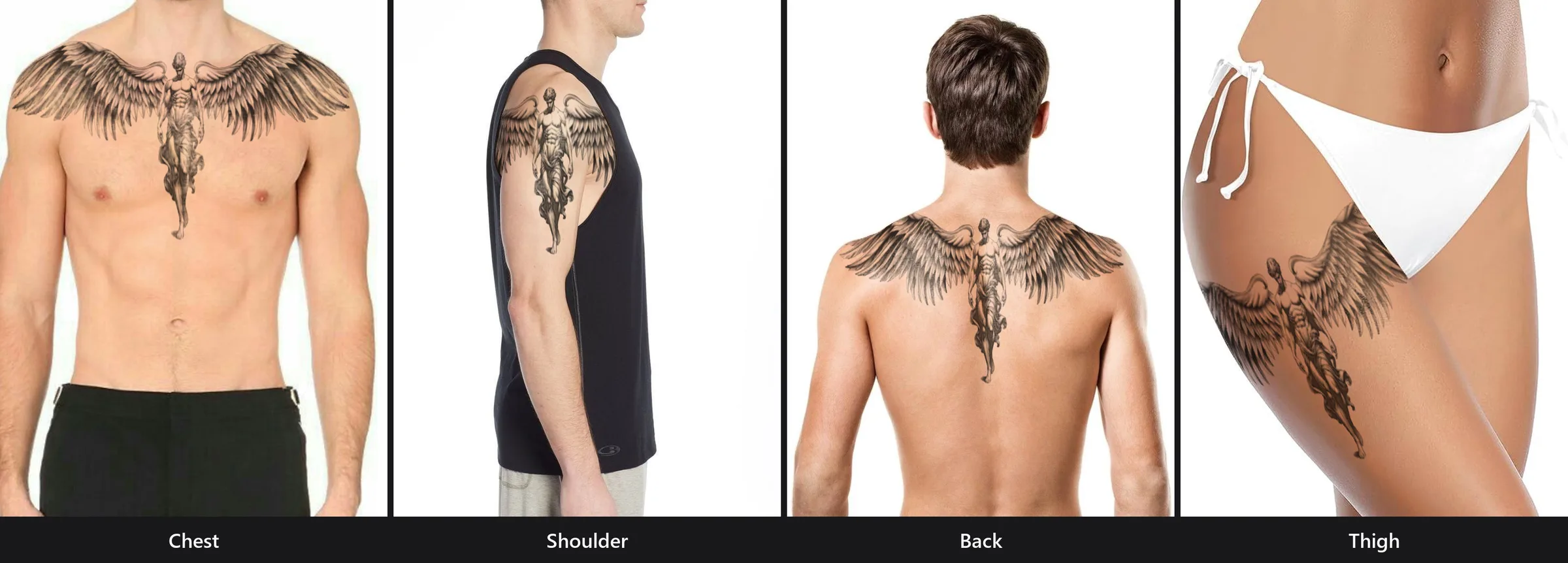
The comparison method
One design, two or three photos, and the preview tool — the whole comparison takes about twenty minutes.
- 1
Photograph every spot on your shortlist
Two or three candidate placements, one clear photo each — same lighting if you can, so the comparison is fair. A forearm shot, a shoulder shot, a thigh shot.
- 2
Place the same design on each photo
Run the preview once per photo with the identical design. Size it appropriately for each canvas — the right size on a forearm and the right size on a back are different numbers, and that difference is part of the answer.
- 3
Screenshot each result
Full frame, not zoomed. You want to see the design in the context of the whole body part, the way other people will actually see it.
- 4
Compare them side by side
Put the screenshots next to each other and react honestly. One of them usually clicks in a way the others don’t — and now the feeling is based on your body, not a stock-photo model’s.
Sizing each version honestly matters — the 3-size method works per placement, too.
Four questions that decide between placements
When two previews both look good, the tie-breakers aren't visual:
Who is it for — you or others?
A forearm faces outward; you and everyone else see it daily. A back piece is mostly for others; a thigh is mostly for you. Decide who the audience is, and the placement often decides itself.
How much will it hurt?
The same session is a different experience by body part — a cushioned outer thigh is far easier to sit through than ribs or spine. Check the pain chart for your candidates before falling in love with one.
How will it age and flex?
High-friction and high-flex areas (hands, feet, inner joints) blur faster. Spots that stretch with weight change (stomach, upper arm) shift over decades. Broad, stable canvases like the outer thigh and back age most gracefully.
What does your life require?
Dress codes, sun exposure at work or sport, and how often the spot is covered by clothing all matter for both healing and long-term fading. The best placement fits the life you actually live.
Deep-dive by placement
Each candidate on your shortlist has its own guide — photo tips for an accurate preview, pain notes, and styles that suit the spot:
Frequently asked questions
Do I need identical photos for a fair comparison?
Similar is enough — clear focus, even light, the area filling most of the frame. What matters is that each preview is realistic for its spot, not that the photos match each other perfectly.
The design only fits one of the spots at the size I want. Is that my answer?
It’s a strong signal. A design that needs shrinking beyond readability on a wrist, but sits naturally on a forearm, is telling you where it wants to live — size and placement are one decision, not two.
Can I show my artist more than one option?
Yes — bring your top choice plus the runner-up screenshot and say which you prefer. Artists give better placement advice when they can see what you compared.
Let your own body break the tie
Two photos, one design, twenty minutes — and the placement question answers itself.
Try inkPEEK free